• This is Part 1 of the computer science theory behind the Train Automaton game. It describes the internal wiring given at game setup. The next parts will cover player input and the consequences for the underlying state machine.

    Under the hood, the game is based on non deterministic finite automata, a computational model to describe regular languages or the more commonly used regular expressions, which is a powerful tool to search for a pattern in a text. Find out more on this type of Automata here: https://en.wikipedia.org/wiki/Deterministic_finite_automaton . Notable difference is that the language accepted by a Train Automaton consists separates the set of all possible words into three sets:

    • The mandatorily accepted words: Green Trains that must be part of the accepted set, where a train can run through the railways and stop at all the stations listed in the trains route in order.
    • The mandatorily unaccepted words: Red trains with routes that must not be possible.
    • The set of other words with an undefined acceptance: Neither acceptance nor denial is required from the automaton.

    Behind the scenes the playing field has a state machine that is a little more complex than what is shown to the player. However the projection is not that difficult.
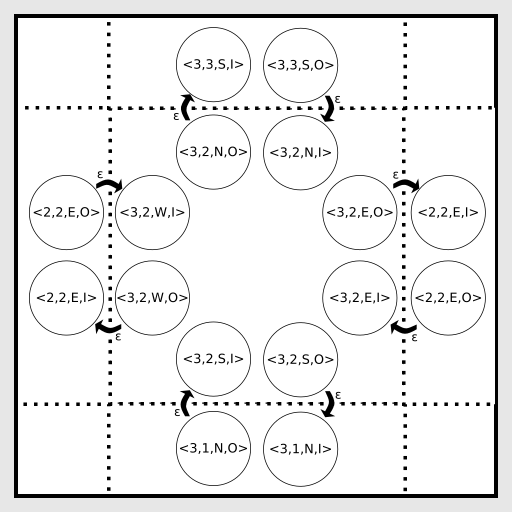
    Figure 1: internal wiring on an empty tile

    Lets first look at the given internal wiring without any player input for a single tile <3,2> and its surroundings.

    Each tile has a x and y position, and 8 internal states. Those states are split up as follows: each of the 4 directions (‘N’,’E’,’S’,’W’) has one ‘in’ (‘I’) and one ‘out’ (‘O’) state.

    Each out-state has an ε-transition to the neighbouring tiles in-state of the corresponding counter direction: e.g. <x,y,’S’,’O’> has a transition to <x,y-1,’N’,’I’>, or in other words, the southern Out-state has a transition to the Southern neighbours in-state.

    There are two exception cases on the edges of the playing field:

    • Regular edge-tiles in the games restrictions do not have some of their neighbors. e.g. the northern edge tiles do not have any more northern neighbors.
    • The entry tile outside the western edge and the exit tile outside the eastern edge: Those tiles only hold the Starting-Out-State, connected to the <x,y,’W’,’I’> neighbor state, or respectively Exit/Accept-In-State, connected to the <x,y,’E’,’O’>
    ¶¶¶¶¶

    ¶¶¶¶¶

    ¶¶¶¶¶

    ¶¶¶¶¶

  • Test Driven Development is a well known technique to produce well tested code. I first heard about it around 3 or 4 years ago from a colleague but only came to apply it in a coding dojo myself for the first time a little more than 1 year ago.

    A process to reliably “generate” unit tests

    The idea is to write a (failing / red) unit test before actually implementing a part of the functionality itself, then implement the functionality until the test is successful / green. Then write a next failing test for a different case or parameter or whatever you like, and continue this cycle. It really is that simple.


    If you wonder why, here are some advantages TDD gives you:

    Refactoring? Not for me, my code is perfect!

    Or so you think… is it really though? Can anyone else maintain it? Why are there these nested if cascades, endless switch statements, or even more basic, what is this variable for?

    The amount of tests produced by TDD for a even a tiny bit of code makes you really fall in love with it, as there was no problem refactoring the code. You can be quite sure, that you still have a piece of code working correct within your defined tests.

    Trust your tests for complexity

    Requirements change and everyone working in software for more than a month or so knows this.

    TDD also helps the functionality to grow organically with the requirements: You thought  attribute A of your class is sufficient as a boolean / integer / string? Well, with the new requirement, you better encapsulate it as a full blown class, with separate functionality. Since you have a lot of tests covering your class, you can start extending A as a new class, and implement until all of your tests are green again.

    Unit tests are saving you time, really!

    Ever said: “Yeah, I am going to write a test after I am done implementing” and then just went to your integrated to quickly to a “developer test”? Ever thought you’d rather not touch this weirdly looking piece of code, because who knows what might break? These two things are probably happening on the same piece of code.

    When you use TDD you will automatically have tests, and you can run them quickly, whenever you work on something, or nightly automated. No need to click through 100 scenarios to be sure moving this variable a bit up to remove another nested loop did not break any fancy case you had not had in your mind in this moment: Try it out and see if it breaks.

    You will get better code, I promise.


    ¶¶¶¶¶

    ¶¶¶¶¶

    ¶¶¶¶¶

    ¶¶¶¶¶

    ¶¶¶¶¶

  • Its already 8 month since the last post. Month that passed quickly. Since January I am working as an official freelance software architect in a scrum team for my customer.

    However there are some ideas that I can now finally pursue with this channel meaning that updates are going to come again soon.

    Topics I am interested will continue to be game design and development related topics, but I currently not see myself as a full game developer, and clicking a unity prototype game together probably does not make me one.

    So here are the topics that will be shown here:

    – Game ideas

    – Code Samples for specific implementations of ideas (in C# for Unity based code, but Java, Groovy,  JavaScript and Python are and probably will stay my stronger languages)

    – Thoughts on the software development process, focussing on agile processes, development and team related techniques and issues.

    ¶¶¶¶¶

    ¶¶¶¶¶

    ¶¶¶¶¶

    ¶¶¶¶¶

    ¶¶¶¶¶

  • So the beta ran over the weekend and I received some hints and input from good friends. I am happy that most of the people I talked to that tried the game, seemed to like it till now.

    I decided that while in beta, I want to push a version on Fridays and Tuesdays, and the same goes for the blog posts. That way, I can celebrate a release and look back on what went good, and what went bad.

    The good

    The patch note list is quite long, and I think the version smoothes alot of smaller problems, that get in the way:

    – delete button now also makes stations transparent
    – committing a level now directly opens the level instead of going back to menu
    – added a sfx off button in the options
    – sfx now happen less often depending on the type of sound
    – added new portrait for robot and boss
    – reworked solution screen
    – redesigned most levels in chapter four and raised their complexity
    – added initial persistance of player progress

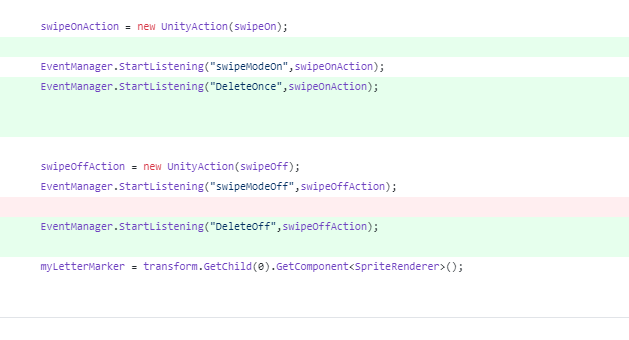
    Due to the Event system, and me starting to use it very early in the development, some features were literally to liners:

    codechangeDeletebutton

    To make the buildings transparent, they just need to listen to another event, and thats it.


    The big one is the solution screen update:

    Unbenannt

    I am not sure if the table is a little info overload, but I will test it out. An idea for monetization would be having high scores only for payed users, and showing links to the shop when the full version is not yet bought.


    The Bad

    The big feature is the player progress. Now the solved levels are stored in a file, which unfortunately requires additional android api accesses namely the famous “App wants to have access to your saved files”, which is really a shame, because all I really want to do is store your progress.


    The Ugly

    I notice, that I need to take time to automate some tasks: I would like to make the Android / Itch.io packages automatically, and push them online. Currently thats manual work. Especially with the apk version it gets annoying: I need to increase the version number manually in the config, also, when switching to a dev build, unity still wants to sign the app, so I need to provide the keys for that for any Android build, that I do. Outsourcing that to a script should be the go to move here.

    Also, I need to increase automated testing again. I am a fan of unit tests, but till now could not get a hang of how to implement this in the component world, even though that should be fairly easy. I need to force myself to do that more.


    ¶¶¶¶¶

    ¶¶¶¶¶

    ¶¶¶¶¶

    ¶¶¶¶¶

    ¶¶¶¶¶

  • Ohh boy, I am so happy. It was a hell of a ride till here, and as said last time, I never thought there would be something playable within four weeks, but I am happy that I was wrong.

    Due to the commitment I gave myself for today, I went straight to pushing the app into the stores, itch.io and googleplay.

    TrainAutomaton on GooglePlay

    TrainAutomaton on Itch.io

    And that looks easier than it was.

    I did not do any research beforehand, on what was going to be needed, so I started sweating a little when all the promo artwork had sizes not even close to what my asset size was. Part of the time this mornign thus into making interesting cuts from the art for different formats:

    Itch.io

    • Project Image 630 x 500

    Google play:

    • HighRes Icon 512 x 512
    • Promo Image 180 x 120
    • Feature Image 1024 x 500
    • Also there should be screenshots of the game
    • as well as a youtube video


    So there you go with your programmer art, happy that you pixelled out a decently looking splash screen

    … and they tell you: Your format does not fit at all. So thats something I learned today I guess.

    Also of course google asked if the game is tablet compatible. What a fun question. I had always tested on my mobile (16 : 9), my HD monitor (16:9) and my 5 year old tablet was gathering dust in one of the drawers… So I took it out and plugged it into the power outlet, immediately noticing that the dimensions are way different. Off I went to my favorite resolution statistics stats site where I got my gut feeling confirmed:

    Leading tablet resolution is 1024 x 768, or 4:3…

    Dang. Oh well. On a tablet there will be a huge red frame around the game components, making it at least not look too bad. But its far from perfect.

    ¶¶¶¶¶

    ¶¶¶¶¶

    ¶¶¶¶¶

    ¶¶¶¶¶

    ¶¶¶¶¶

  • Ok. Four weeks ago, I would not have thought to get a real game out in 4 weeks. This Friday is approaching fast, but I feel it is very possible to get the TrainAutomaton out on GooglePlay and itch.io this Friday. Today, I will finalize the second and third level pack, and if time is left, invest in my artwork. Tomorrow is there to prepare a youtube trailer and some Splash Screens for the project pages in said stores, and Friday is all about trying to get the stable build into the store.

    Yesterday in the evening I already made an itch.io Account. Its a pretty cool page, so I hope to get some input there by my friends.

    I will go into an open beta mode with this launch and only tell my friends about it. I hope to have enough credit with them, so that they still like me afterwards, and maybe like the game. Maybe a short questionaire would be nice…


    ¶¶¶¶¶

    ¶¶¶¶¶

    ¶¶¶¶¶

    ¶¶¶¶¶

    ¶¶¶¶¶

  • ·

    Today was the final day of week three. I am happy with my progress, although I think I am not exposing the Train Automaton enough to other people.

    My wife gave me some feedback on the tutorial levels I was working on today, and I showed the version some friends. If you want to test the game, I can provide an apk or windows version, just get in touch.

    To the stuff I have:

    Tutorial levels:

    This week I decided to reduce the user features in the initial level pack to only designing the layout of the tracks. The levels will consist of not only requested trains, but also a fix number and positioned buildings. This opens some interesting design avenues, and I was building levels during this afternoon.

    I find it quite hard to get a difficulty curve that is not too steep, but in the current iteration, it is getting better.


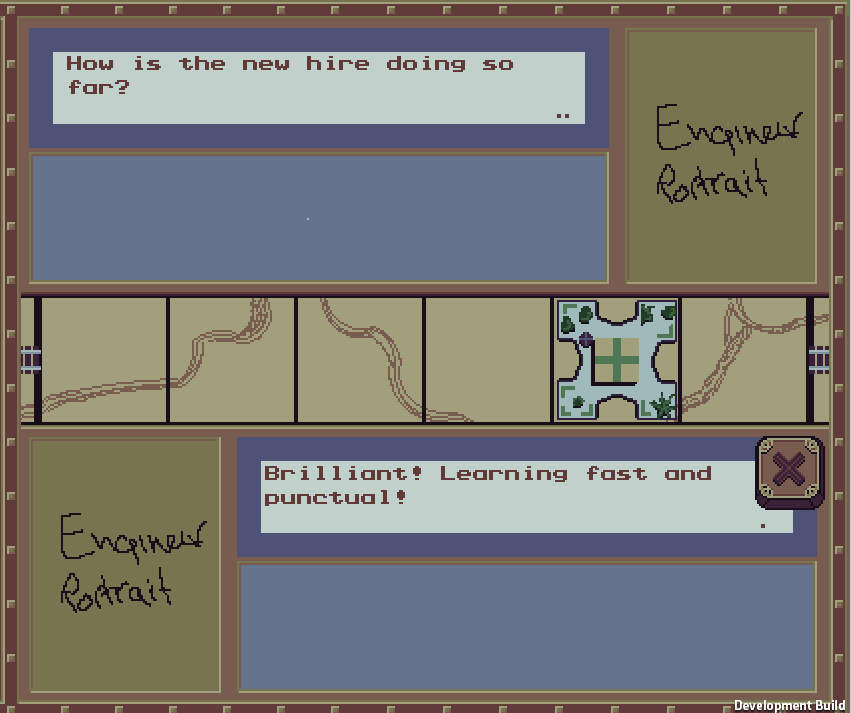
    Also, for a tutorial, some dialog system seemed necessary, so dialogs

    ¶¶¶¶¶

    ¶¶¶¶¶

    ¶¶¶¶¶

    ¶¶¶¶¶

    ¶¶¶¶¶

  • Make the user reset, not regret.

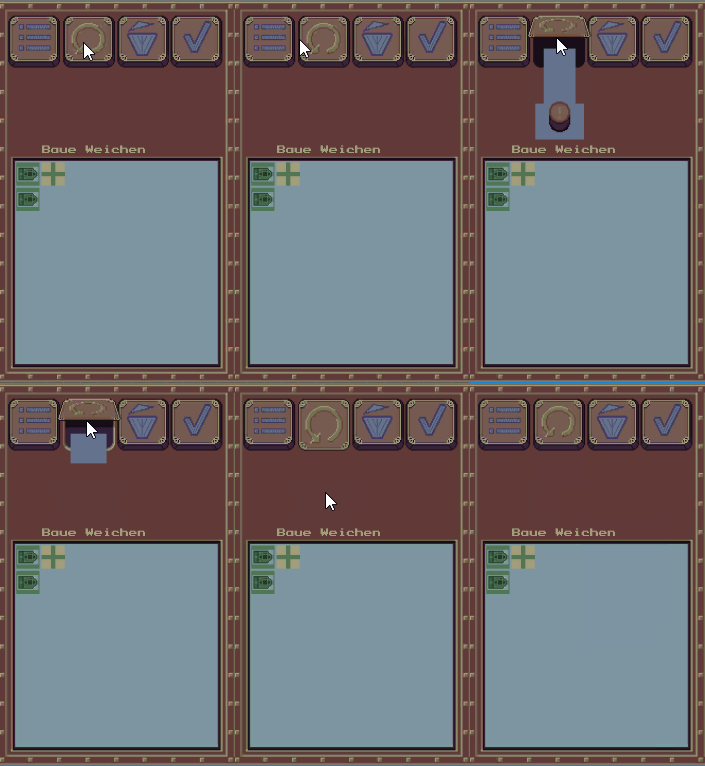
    Today I wanted to stop the user from accidentally resetting his solution, since I noticed players would sometimes do so. In my first iteration, I would have a normal menu like popup. But that seemed very intrusive.

    So I came up with the idea of adding a little animation to the button, that shows the user a “red button of kaboom”.

    resetRaw
    Do you really want to destroy your solution?

    Other animations.

    afterwards I was working on the animation to clarify a train cannot leave the level without missing his goal. Since there is a potentially large number of stations, that fulfill a request along the list of requests, I added checkmarks to the stations that are ok. But then it gets a little bad. How to show, that there is no other way from the last possible and desired step? I am still not sure, but I will see, what I can do..

    ¶¶¶¶¶

    ¶¶¶¶¶

    ¶¶¶¶¶

    ¶¶¶¶¶

    ¶¶¶¶¶

  • This week starts with steam! I iterated over the train animation, and now little clouds apear near the train. Also the train now has a coal waggon and a car.

    choochoo
    ChooChoo! The train rides with wagons and steam.

    I actually did try to animate the waggons each on their own, but that was a real pain:
    The animations where never in sync, no matter what I tried. The engine would end the animation of the current tile, while the other ones where not even close to finished, or sometimes it was the other way around. That was not due to all of them “starting” on a tile at different times though…

    So now I have 12 animations: for each direction d in (left, right, straight) there are 3 with (d,d’) and one “standing” animation, that fills the frame when moving from one tile to the next.


    Finishing up open threads

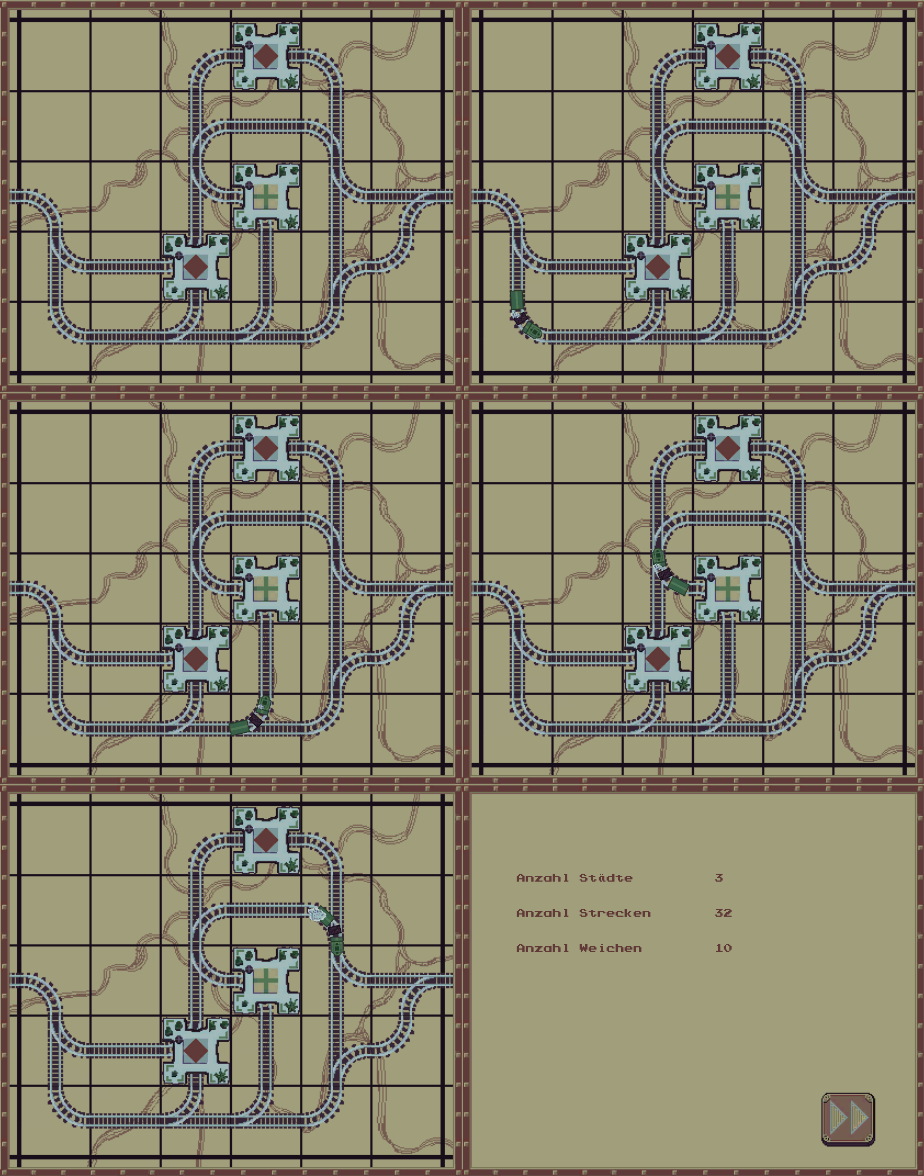
    Last week I left with a scoring screen, that still presented Todo values to the user. I wanted to get rid of this, so I also implemtented the initial counting of number of towns, rails and switches, that I want to use later on for a rating of the users solution. An interesting feature I see coming up in other games is a “world best list” where you see your solution against others. I would like to have something like this, but its certainly not the most important feature.

    solutionscreen

    ¶¶¶¶¶

    ¶¶¶¶¶

    ¶¶¶¶¶

    ¶¶¶¶¶

    ¶¶¶¶¶

  • This week ends early for me. Tomorrow I will go to the Spiel in Essen, and see whats new in the world of boardgames. My Milestone this week was called visually polished alpha, and I am not quite where I wanted to be yet.

    Yesterday and the day before:

    The day before yesterday was travelling. When I reached home, I felt not yet ready, but I did not continue working because there was some immediate stuff to do at home.

    Yesterday I went to for an appointment in the morning, and see some friends in the early afternoon. Another half a day, and not ideal. But at my friends, I at least gathered some early feedback from them, and finally – FINALLY – found out why one particular nasty bug was happenening when watching them play. I could not reproduce it at home before, but when seeing them I noticed, how they swiped over the UI.

    Today stuff got done:

    Today in the morning I had another appointment… stuff that kills your time. But well. afterwards I immediately got into fixing said defect. Afterwards I finalized the train animation I was working on during the last days. Now, when a solution is found (in the positive case), a train rides the way across the screen.

    animatedTrain

    Since I know, users might not want to see and wait for it after one or two times, I implemented a skip button.

    I also started with a basic menu  and a solution rating screen, but I am not yet convinced about the basic art I am using there. There will be some rework happening, when I find my joy of painting.


    Overall the main loop looks at least somewhat polished, or rather primed. I want to add a coal car and a passenger car to the train, but I could not get the animation done in time, so the train rides solo for now. The menus need work.

    Menu

    I am really looking forward to improving the artwork, and adding some animations. I think with the steampunk theme, there is a lot room for creativity, and I will have to see how much time I should really allocate for that, but I guess the visuals need to be attractive, so there can almost not be too little.

    ¶¶¶¶¶

    ¶¶¶¶¶

    ¶¶¶¶¶

    ¶¶¶¶¶

    ¶¶¶¶¶